












To log in to Acepokie, open the official site, tap Login, enter the mobile number or username linked to your account and type your 6 to 20 character password. If the password is lost, the Forgot Password link under the login button starts the recovery process, and new players can switch straight to Register from the same panel. The same credentials work on desktop, the mobile site and the Acepokie app.
Because every Acepokie account is created with an Australian mobile number and SMS verification, the phone linked to the profile plays a central role in both sign-in and recovery. The sections below cover the login steps, registration, password reset, the most frequent errors and the security habits that protect an AUD balance.
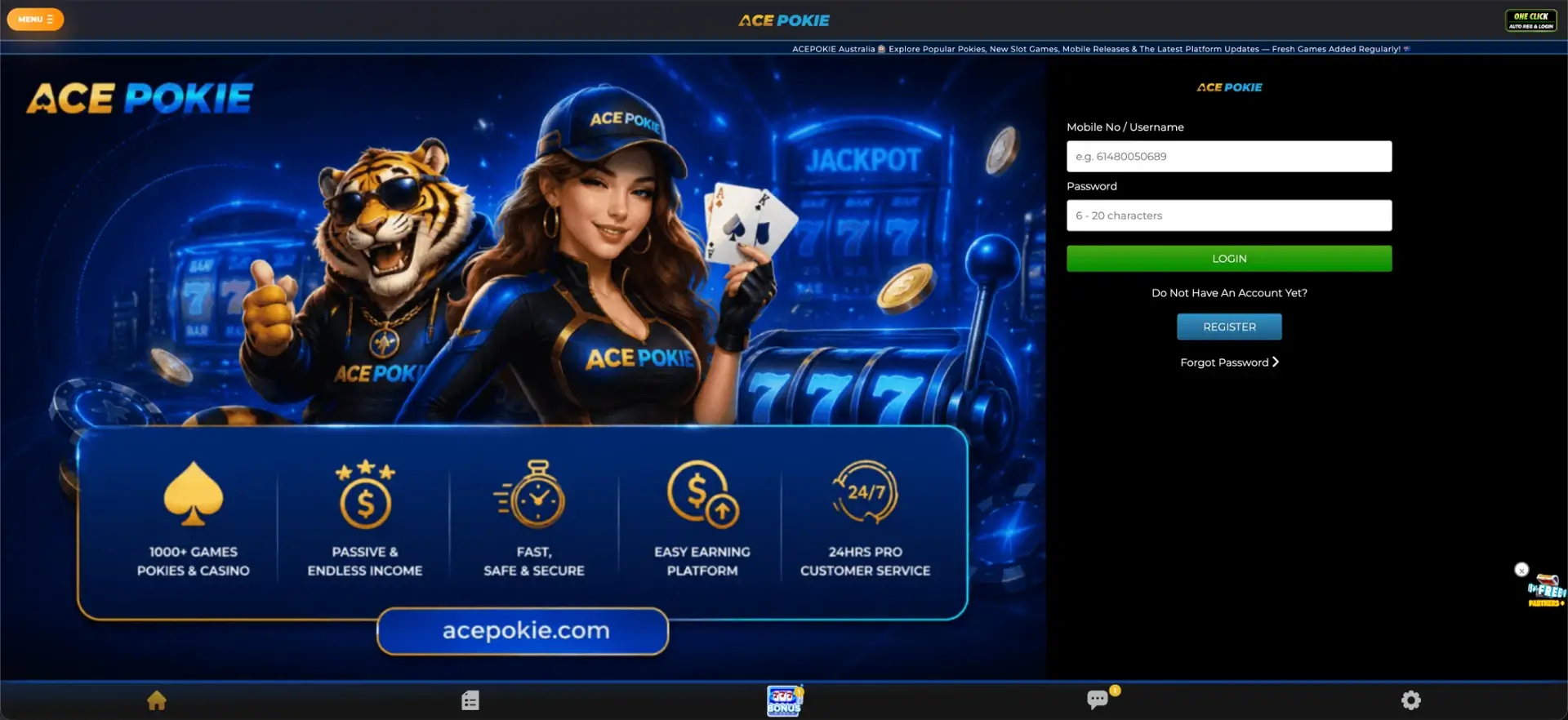
Acepokie login essentials
The login panel is compact, and most of what a player needs to know fits into a few lines. The table collects the key details in one place.
| Login item | Details |
|---|---|
| Where to log in | Login button on the official Acepokie site or in the app |
| Login field | Mobile number or username |
| Password | 6–20 characters, case-sensitive |
| Password recovery | Forgot Password link |
| New account | Register button in the same panel |
| Verification at sign-up | SMS code sent to the mobile number |
| Device support | Desktop, mobile browser, Acepokie app |
| Account currency | AUD |
| Support | 24-hour customer service |
How to log in to Acepokie
Existing players only need the identifier and password chosen during registration. Acepokie accepts either the registered phone number or the username in the first field, which is handy for anyone who has forgotten one of the two.
Step-by-step login
The whole process takes less than a minute on a stable connection.
- Open the official Acepokie site or launch the app.
- Tap Login at the top of the page.
- Enter your registered mobile number or username.
- Type your password, paying attention to upper and lower case.
- Tap Login to open your account and AUD balance.
When entering a phone number, use the same format as during registration. A mismatch between a leading zero and the +61 country code is one of the most frequent reasons the system does not recognise an account.
Create an account if you do not have one
Players without a profile can go from the login panel straight to Register. The form asks for only a handful of details, but the full name needs extra care: it must match the name on the bank account used for payments, because that comparison is made during withdrawal checks.
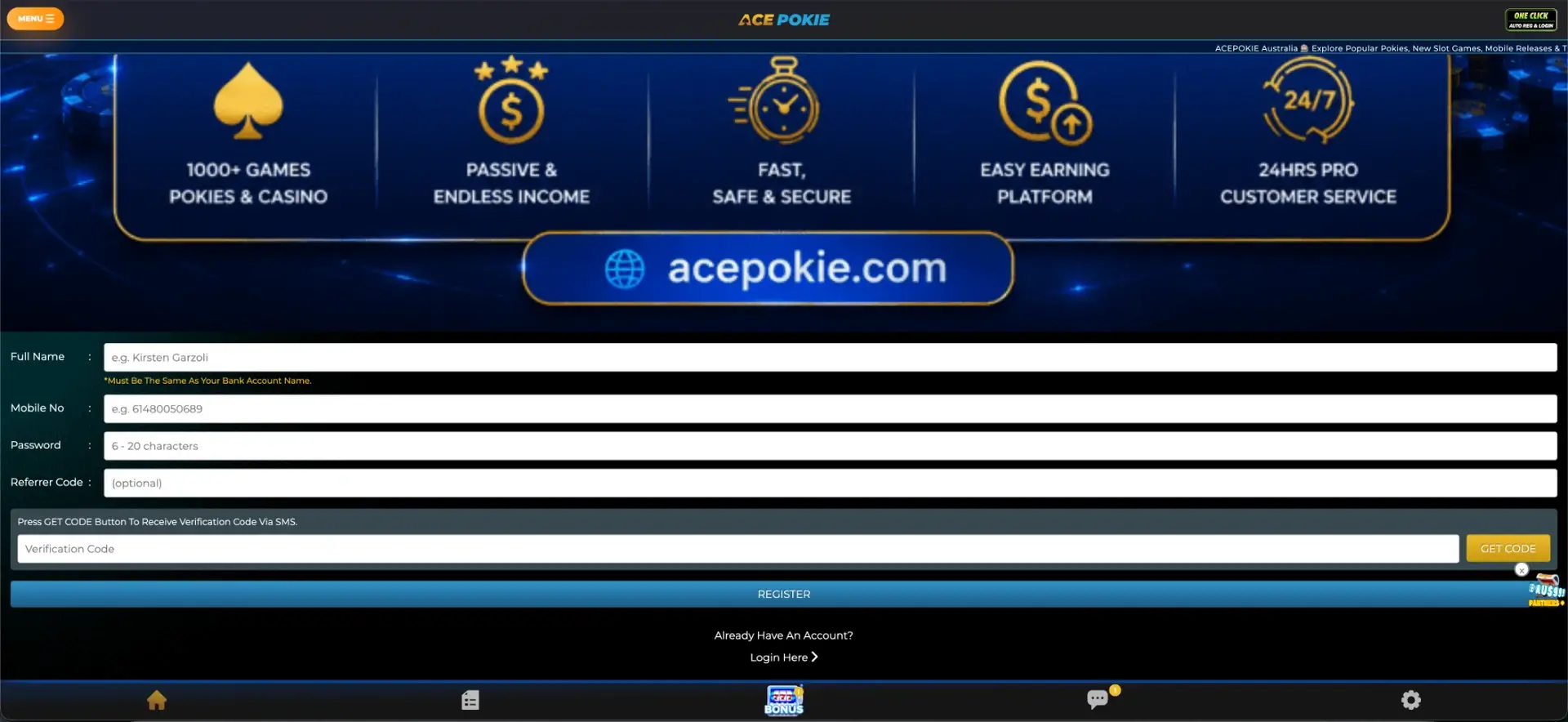
Quick registration flow
Registration and the first login can be completed in one sitting.
- Enter your full name exactly as it appears on your bank account.
- Add the Australian mobile number you will use for the profile.
- Create a password between 6 and 20 characters.
- Fill in the optional Referrer Code only if you received one for a specific campaign.
- Tap Get Code and wait for the SMS.
- Enter the code and submit the form.
Once the account is created, the same phone number and password are used for every future login.
Forgotten Acepokie password
Repeatedly guessing a password can trigger a temporary lock, so the better route is the Forgot Password link from the start. Recovery relies on the mobile number tied to the account, which is why access to that phone is usually required.
Password reset steps
The exact screens can change over time, but a reset on a phone-based account usually follows this order.
- Tap Forgot Password under the login button.
- Enter the mobile number linked to your Acepokie account.
- Wait for the verification code by SMS and enter it.
- Create a new password of 6 to 20 characters.
- Log in with the new password.
If the registered number is no longer in use, contact 24-hour support before trying anything else. Opening a second account to get around the problem can lead to both profiles being restricted.
Acepokie login on mobile
Acepokie offers both a mobile site and a downloadable app, and both use the same account. There is no separate mobile profile, so balance, bonus progress and transaction history stay identical across devices.
Tips for mobile sign-in
A few simple habits keep mobile access smooth and secure.
- Install the app only through the official Acepokie download button.
- Avoid saving the password in the browser on a shared phone or tablet.
- Keep a screen lock on the device that receives SMS codes.
- Log out after playing on any device that other people use.
- Update the app or browser when a new version is offered.
Troubleshooting common Acepokie login errors
Most sign-in problems have a simple cause and can be fixed in a few minutes. The subsections below cover the situations players run into most often.
Incorrect credentials
If the system rejects the details, check the phone number format first, then the password. Passwords are case-sensitive, so a Caps Lock key left on is enough to block access. Trying the username instead of the phone number, or the other way round, can also help.
Browser or cache issues
When the page loads but the form does not respond, the problem is usually local to the browser.
- Clear the cache and cookies, then reload the page.
- Disable ad blockers or script blockers for the Acepokie site.
- Switch to another browser or try the app instead.
SMS code does not arrive
Delays in SMS delivery are often caused by weak reception or a full message inbox. Wait a minute before requesting a new code, check that the number entered is correct and make sure the phone can receive messages from short or international senders.
Account blocked or restricted
Several failed attempts, a security check or unfinished verification can temporarily restrict an account. In that case, support is the only route back in, and they may ask to confirm identity details or the registered phone number.
Login page does not open
Sites that serve Australian players sometimes change addresses when a domain is blocked by local internet providers. If the usual link stops working, find the current official address through Acepokie support rather than through random mirror sites, which can be used for phishing.
What you can access after logging in
Once signed in, the full platform becomes available from one dashboard, with the AUD balance at the top of the screen.
- Slot: 1,000+ pokies and casino games with search and a Hot list.
- BONZA: a separate lobby of quick-round games with round history.
- Event, Live and Sport: promotional titles, live dealer tables and a sportsbook.
- Bonus hub: rebates, free chips, Daily Mission, Royalty and VIP rewards.
- Cashier: deposits from AUD 10 and withdrawals from AUD 30.
- Chat and settings: 24-hour support and account options.
Account verification (KYC)
The SMS code confirms the phone number at registration, but a fuller identity check can appear later, most often before the first withdrawal or when larger amounts are involved. Acepokie compares the account name with the payment details, so a correct name at sign-up removes the most common cause of delays.
When verification is requested, it typically involves a photo ID such as an Australian driver licence or passport and, in some cases, proof of address or proof of ownership of the payment method. Documents should only be uploaded through the account or sent to official support, never through links received from unknown contacts.
Acepokie login security
An Acepokie account combines a balance, payment details and personal data, so the login deserves the same care as online banking. The phone number is effectively a second key to the account.
- Use a password that is not reused for email, banking or other gambling sites.
- Never share passwords or SMS codes, including with people claiming to be support.
- Check the address bar before entering credentials.
- Contact support immediately if account details change without your action.
- Keep the account away from minors on shared household devices.
Acepokie login FAQ
These answers cover the most common questions about signing in and restoring access.
What do I enter in the Acepokie login field?
Enter your registered mobile number or username, then your password.
How long should an Acepokie password be?
Passwords must be between 6 and 20 characters. They are case-sensitive.
How do I reset my Acepokie password?
Use the Forgot Password link under the login button and follow the SMS-based recovery steps.
Can I use the same Acepokie login on mobile?
Yes. The same credentials work on desktop, the mobile site and the Acepokie app.
Why is my SMS code not arriving?
Check the number entered, signal strength and inbox space, then wait a minute before requesting a new code. If the problem continues, contact support.
What if I no longer have my registered phone number?
Contact 24-hour customer service before taking any other action. Do not open a new account while the old one is still active.